
Understanding how your membership fees work helps you manage your portfolio effectively. This guide explains how fees are calculated, when they are deducted, and how you can customise your payment preferences.
What is the Membership Fee?
The Membership Fee is a monthly charge applied to all Wealth99 accounts. This fee covers the costs of providing licensed custody for your digital assets, protecting your holdings with institutional-grade security in a regulated environment.
How is the Membership Fee calculated?
We use a tiered structure based on your average portfolio value over a 30-day period.
-
Tier 1 (Balances up to $100,000): A fixed fee of $1 per month, plus a 0.95% annual fee on your crypto assets (charged monthly).
-
Tier 2 (Balances above $100,000): For any amount exceeding $100,000, the annual fee is reduced to 0.50% (charged monthly).
Example: On a $150,000 crypto portfolio, the first $100,000 is billed at the Tier 1 rate, while the final $50,000 benefits from the reduced Tier 2 rate.
How is my portfolio value determined?
To ensure your membership fee is fair and reflects market fluctuations, we use an average daily balance over your 30-day billing cycle. This means we take a snapshot of your crypto holdings each day and calculate the average value at the end of the period.
-
What is included: All cryptocurrencies held in your Wealth99 Wallet.
-
What is excluded: Your traditional cash balances (AUD, GBP, or EUR) are entirely excluded from this calculation.
When is the membership fee deducted?
From 1 July 2026, all accounts follow a calendar-month billing cycle, with fees deducted on the 1st day of each month.
Accounts created before June 2026: As part of the transition in June 2026, a one-off partial charge was applied to cover only the days between each account’s previous billing date and 1 July 2026. This aligned all accounts with the new schedule and did not result in double billing.
New clients: If you join partway through a month, your first charge will still be processed on the 1st day of the following month. You will only be charged for the exact number of days your account was active.
Example: If your account was active for 10 days in your first month, we calculate your fee based on a daily snapshot of your balance across those 10 days and bill you only for that period. From then on, you will be billed for full calendar months on the 1st day of each month.
In which currency is the fee paid?
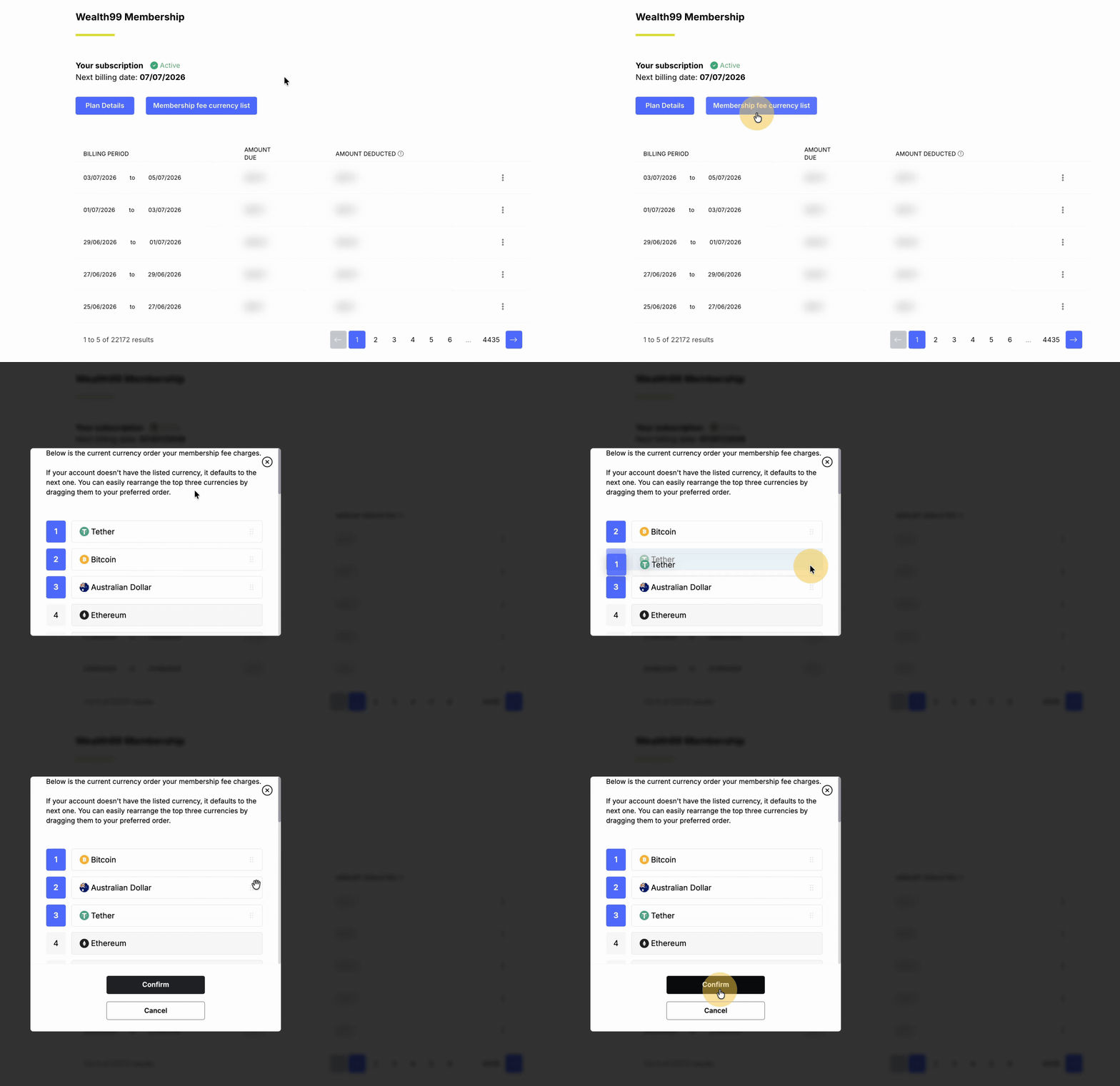
There is a default order of coins used to collect the fee. You can customise the order of the first three coins to align with your strategy.
Default Payment Structure: Wealth99 Australia
-
AUD
-
Tether (USDT)
-
Bitcoin (BTC)
Default Payment Structure: Wealth99 Global
-
GBP
-
EUR
-
Bitcoin (BTC)
If your primary asset does not have a sufficient balance, the system will automatically move to the next asset in the sequence. This will continue until the fee is successfully deducted or there are no remaining eligible coins. You can view the full coin deduction structure in Settings > Membership > Membership Current List.
How do I change my currency payment order?
If you wish to prioritise a specific asset for fee payments among the 3 available options, follow these steps:
1. Navigate to the Settings page in the left-hand menu and select the Membership tab.
2. Click on Membership Fee Current List.
3. Drag and drop the assets into your preferred sequence, and then click Confirm Changes.
How can I view my membership fee payments?
You can review your complete membership billing history, including each billing period and your upcoming payment date, by going to Settings > Membership, selecting the ⋮ menu, and choosing Details.
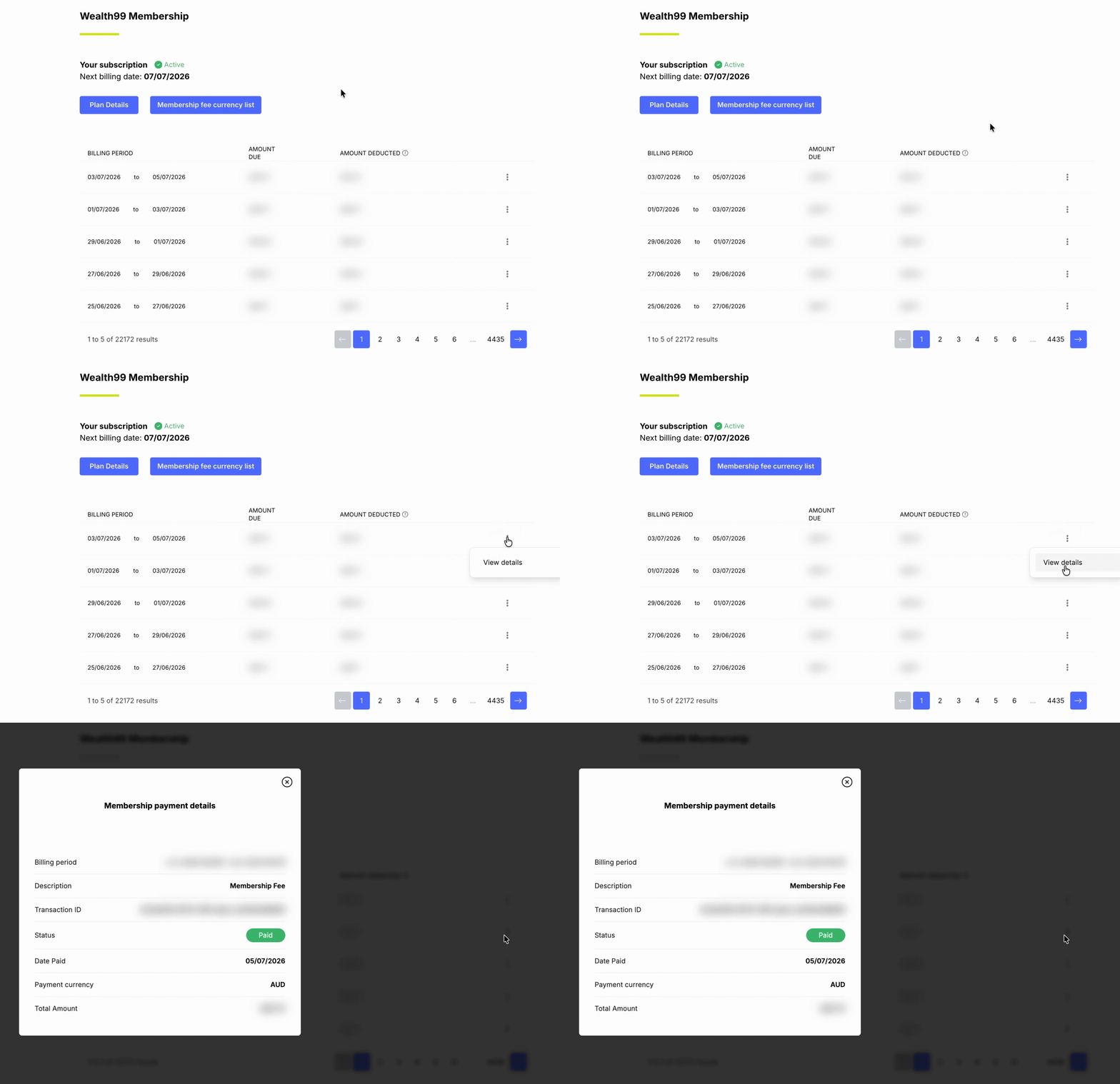
The membership fee deductions are also recorded in your transaction history as Membership Payment.
When did this fee structure begin?
This fee structure was introduced on 1 May 2022, with the first deduction applied in early June 2022.